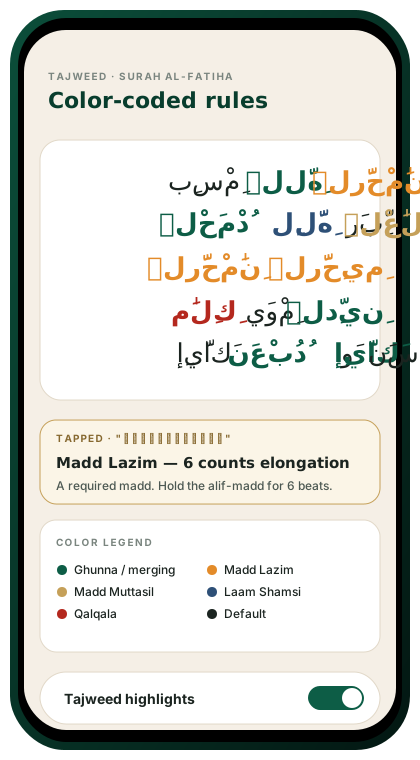
Color-coded, in the mushaf
Turn on tajweed highlighting and the verse you’re studying becomes a living lesson. Each rule is color-coded:
| Color | Rule |
|---|---|
| Red | Ghunna (nasalization, 2 counts) |
| Orange | Ikhfa (partial concealment) |
| Yellow | Idghaam (assimilation) |
| Green | Madd (elongation) |
| Blue | Qalqala (echo) |
| Purple | Iqlaab (conversion) |
Tap any highlighted letter for a short explanation and an audio example.
Rule library
Each rule page includes:
- A plain-language definition.
- A Quranic example with audio.
- A visual diagram of mouth position (optional, on request).
- Common mistakes and how to catch them.
Rules covered:
- Noon Sakinah and Tanween (Idhaar, Idghaam, Iqlaab, Ikhfa)
- Meem Sakinah (Idghaam Shafawi, Ikhfa Shafawi, Idhaar Shafawi)
- Laam Sakinah (Shamsi, Qamari)
- Madd (Asli, Muttasil, Munfasil, ‘Aarid, Laazim)
- Qalqala (Sughra, Kubra, Akbar)
- Ghunna
- Special cases (Shamsi/Qamari merging, Waqf rules)
Why it works
Memorizing while noticing the tajweed rules creates a dual encoding — you remember how the verse sounds and why it sounds that way. When the recitation verifier later flags a tajweed miss, you’ll already have the rule in mind to fix it.
Scholar reviewed
All tajweed content is reviewed by qualified teachers on our Scholar Panel.
Beginner option
If you’re early in your journey, you can hide all highlights and keep a clean mushaf view. Turn them on when you’re ready.
Recitation verifier + tajweed mode
With tajweed mode on, the recitation verifier checks for tajweed compliance — not just word accuracy. A missed ghunna or madd shows up in amber, with a one-tap explanation.

